One of my goals is to have more technology resources available for teachers to integrate into their classroom. I plan to post a weekly (maybe more frequently) tech tip that you could use in your classroom. Some will be real short and easy to intergrate and others will require more time and thought prior to using them. If you come across a resource that you would like to share, please let me know and I will gladly add it to the tech tips!
The Week of October 17th - October 21st, 2011SUBJECT THAT COULD USE TIP: Science Teachers and Statistics Teachers This website has oodles of fun and useful information specifically for science classes. One large area of the site is interactive sciences, like hitting a baseball, and playing with lightening. http://whyfiles.org/category/interactives/ Another portion of this site is the Cool Science images. This area houses pictures of the really cool science stuff that is super hard to explain by itself. http://whyfiles.org/category/cool-science-images/ Lastly, the site also have current event science articles available for students to read. The home page has all of the current events and relevant information here: http://whyfiles.org/ Be sure to check it out! If it doesn't work in your classroom, you could always pass it to your students too. :) The Week of October 3rd - October 7th, 2011SUBJECT THAT COULD USE TIP: The World Being Homecoming week, we have been crazy busy at St. James! Quick shout out to Carrie Hubbard for being back at SJA too! Whoop! Whoop! This weeks tip really isn't a tip- it's paying tribute to Steve Jobs, the former CEO of Apple. Be sure to check out the ONLY commencement speech he gave to Standford University. If we look at embracing technology and the change in thinking like Jobs did- we could see a big difference in our lives and our students. :) http://www.ted.com/talks/steve_jobs_how_to_live_before_you_die.html Here are a couple of quotes from Steve Jobs as well for you to ponder on this festive Friday: "Your work is going to fill a large part of your life, and the only way to be truly satisfied is to do what you believe is great work. And the only way to do great work is to love what you do. If you haven't found it yet, keep looking. Don't settle. As with all matters of the heart, you'll know when you find it." "Here's to the crazy ones, the misfits, the rebels, the troublemakers, the round pegs in the square holes ... the ones who see things differently -- they're not fond of rules, and they have no respect for the status quo. ... You can quote them, disagree with them, glorify or vilify them, but the only thing you can't do is ignore them because they change things. ... They push the human race forward, and while some may see them as the crazy ones, we see genius, because the people who are crazy enough to think that they can change the world, are the ones who do." The Week of September 19th - Sept. 23rd, 2011SUBJECTS THAT COULD USE TIP: All teachers and English Teachers First, I wanted to share an article with you about how to incorporate technology into your classroom daily. The BEST thing that I can say, is we at SJA do MANY of the things on the list already! Whoop! Whoop! :) Check it out! http://www.edutopia.org/blog/20-ways-model-technology-students-heather-wolpert-gawron
Second, is a website that deals with vocabulary practice. It has grade level words for Freshman through AP Seniors. You click on the grade and then can click on a unit to see what words are included. Once you choose a unit, then one of various practice options. Here is the choices that you have once you have chosen a unit. :) Try it out! :) http://vocabtest.com/ 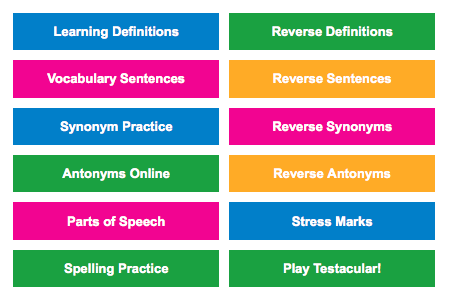 The Week of September 6th - Sept. 9th, 2011SUBJECTS THAT COULD USE TIP: All subjects Today, I want to share a Learning Blog, http://learning.blogs.nytimes.com/ This blog is updated daily started Sept. 12, 2011. Here are some things that they post: - A daily Student Opinion Question - Could be used as a journal topic? - A daily test yourself question - Covers literacy and math - On this day in History - Daily News Quiz and 6 Q's about the News - Word of the Day, Time's Fill-in, and Student Crossword - Teach any day's Times with activity sheets that include games, graphic organizers, maps, and discussion starters. -Watch monthly film festivals of classroom-worthy documentaries on often-taught or newsworthy topics, with help from our partner SnagLearning. - Be sure to watch them first! -Quickly find Times and Learning Network resources for often-taught subjects, from global warming to immigration to Shakespeare, via our Teaching Topics page. -Each week we pair a poem with a piece from The Times that echoes, extends or challenges its themes. Be sure to check it out! There is a large amount of resources that we can use! :) The Week of August 22nd - August 26th, 2011SUBJECTS THAT COULD USE TIP: Social Studies, Geography, Technology, English Looking for a Question of the Day or a pre-populated question that you could use for extra credit that challenges students? Or do you have five or ten minutes left in class that you don't want to waste? Look at www.agoogleaday.com Here is a question a day that challenges the user to research and search the web effectively. The screen opens and provides directions. An example, Sunday's question was "Contrary to popular belief, the Sahara isn’t the biggest desert on Earth. How many square miles is the largest?"
| The Week of October 10th- October 14th, 2011SUBJECT THAT COULD USE TIP: All teachers - specially any that use video clips in their classes We know that there is various video sites that we can access for educational videos to show in our classes. The problem we sometimes face is not having the students being able to access the videos. This tip doesn't fix that issue....yet! (but keep reading) Here are a couple sites that you could use - I wouldn't guarantee that they won't be blocked for the kids but there is still a lot of great resources out there! SchoolTube: Videos made by schools posted for schools http://www.schooltube.com/ GodTube: All sort of videos with a Christian filter http://www.godtube.com/ A new one is Google Video. It is a branch of Google but brings back videos related to the subject or content that you are searching for. (Most are from Youtube but is quicker to find) http://video.google.com/ Now, as I mentioned if you have a youtube video and you want your students to be able to access it during school- you could always convert the video into a .m4v or .mov file. One site that I use to do this is http://keepvid.com/ Save it onto your computer (not on your desktop or documents folder though), upload it to Studywiz and there you go! One final note on using videos in class. Many times we leave a video for the students to watch when we are going to be absent- PLEASE PLEASE check the link on a student computer prior to leaving so that it will work with your sub. :) If it doesn't you can try to convert it with Keepvid or another site or talk to myself and we can brainstorm together! Happy Lesson Planning! Have you used either of these sites before? The Week of September 26th - Sept. 30th, 2011SUBJECT THAT COULD USE TIP: All teachers and STUDENTS!! Are you teaching a chapter that has a lot of important vocabulary that students do not understand? Do you have a student who is struggling with some basic concepts? Do you need to match the elements? Then try out http://quizlet.com/. This is a website to create a list of vocabulary or any other information that needs to be paired up. To make your own Quizlet flashcards, you will need to sign up but it is free (Remember during in-service I suggested that you develop a junk email with a default password that you use for all of these kind of resources) Once you make your flashcards, you can share the link in a regular Studywiz assignment or handout. Kids have 5 different ways then they can use these flashcards- speller, learn, test, and then two games they can play. BONUS: Since finding this website in the last week, I have had 2 student come talk to me about how they are using Quizlet on their own to study for their own exams. :) :) Students are even using it on their own! HOW AWESOME!!!
The Week of September 12th - Sept. 16th, 2011SUBJECTS THAT COULD USE TIP: All teachers and students Today, I am sharing a site that direct students to where they should go when working on a digital project and they need images. Copyright is something that needs to be addressed sooner rather then later (additional blog posts on this topic in future! :) ). The links that are included take students to different sites based on what type of images they need. They also include sound clips for the next time they need to add audio into a project. This is just a great resource to bookmark and pull up when you or your students need some images. :) http://mrssmoke.onsugar.com/Best-Sites-Find-Public-Domain-Images-Sounds-Student-Projects-3152550 The Week of August 29th - September 2nd 2011SUBJECTS THAT COULD USE TIP: All of us could use this tool! Do you ever get tired of boring powerpoints or Keynotes? Do you get tired of presenting with them? Try Prezi, an online presentation tool. Educators get a free upgrade with bigger storage and being able to download for offline presenting. Look at www.prezi.com then http://prezi.com/profile/signup/ Scroll down and click the educator link for the free upgrade. If you use Prezi, let me know! I'll post your link for others to see! |